Showing posts with label iphone 6. Show all posts

Wednesday, September 10, 2014

Pre Order Day of iPhone 6


Pre-order Day: September 12 Midnight via Apple online Store.

Selling Day: September 19 via Apple retail store. There are already crazy Apple fans who are lining up in front of Manhattan retail store a week before in order to become the first one to own the iPhone 6.

First Release Country: United States, Canada, United Kingdom,  France, Germany, Australia, Singapore, Hong Kong, Japan.


Thursday, September 4, 2014

How to Transfer Everything from iPhone 5/5S to iPhone 6

With the release of iPhone 6 in Sept 9, many iPhone users like me are preparing to purchase the device when available. As we know, iPhone 6 is powered by iOS 8, which is a totally new mobile OS designed for iPhone 6. It’s a bit hard to transfer the content stored on iPhone 5/5S/4S to the new iPhone 6.

I have done some research on this topic and finally figured out two easy ways to help your transfer content to iPhone 6 without much effort. I have tested them on my new iPhone 6 and it works great for me in both way. Below are the details on how to get that.

Method 1: Using iCloud to Transfer Content


As one  of the leading cloud storage services, iCloud is used by millions of iOS users to back up content on your iPhone, iPod and iPad. If you have synced your service with iCloud before, then you can easily restore those content to your iPhone 6 with iCloud.
  1. Go to Settings on your iPhone 6 home screen
  2. Scroll down the table list and tap iCloud button
  3. Sign in iCloud account with your Apple ID and password
  4. Select the items you want to sync by swiping item button from left to right
When everything is set up properly, iCloud will start transferring contents from its server to iPhone 6. It takes some time depending how many files you are going to sync. Usually, the photo folder is much bigger than other documents.

Please note, iCloud is limited to transfer a few items. There are: Mail, Photo, Contacts, Reminders, Safari, Notes, Passbook and Document data. For other items, you have to use the method mentioned below.

Method 2: Using iPhone 6 Transfer App

In case you didn't use iCloud before or there are some private data that iCloud doesn’t support to sync, you have to figure out a new way to transfer such items to your iPhone 6. Previously, there are some good transferring apps for data copy between different iDevices. However, it will no longer work because of those apps are not ready for iOS 8. Luckily, iPhone 6 Transfer is not on the list.

iPhone 6 Transfer is a powerful tool that can be used to transfer all kinds of items between different mobile phones, such as iPhone, Android, Blackberry and Nokia. The newest version has added support for iOS 8, so you can use it to transfer content from other smartphone to iPhone 6, including iPhone 5/5S/4S. Here is the step by step guide:

Step 1: Download and Install iPhone 6 Transfer
The download file is available below. Install the program on your computer when download is completed. Just stick to the default installation wizard, it only takes a minute to fully install it. Run the program when installation is done.
Step 2: Connect Old iPhone 5 and iPhone 6 to the Same Computer
Plug both devices on the same computer via USB cable. Make sure iTunes was installed previously and close it during this time. iPhone 6 Transfer will automatically detect both devices when they are connected well and display device info after device.


Step 3: Transfer Selected Items from iPhone 5 to iPhone 6
As you can see from the main screen, there are a number of files supported for transfer, like contacts, photos, text messages, media library and so on. Select the items you’d like to sync by clicking on the checkbox in front of the items. After that, click Start Copy button to start transferring selected items to iPhone 6.

Wednesday, September 3, 2014

Leaked Photo of iPhone 6 Battery

We’ve already seen alleged 1,810mAh, 2,100mAh, and 2,915mAh batteries bound for Apple’s upcoming handsets and now the strongest 2,915mAh module has been showed off on a set of new photos posted Tuesday morning by the French publication NowhereElse.

iphone 6 battery


The battery in these latest photos appears identical to one detailed in a leak last month from Chinese site Apple Daily, down to the March 2014 manufacturing date. The authenticity of either part is unconfirmed, but both batteries have markings similar to other Apple batteries and appear to be sized for a larger iPhone model. Both are also still from the prototype stage, with placeholder text used in several locations on the batteries.

Apple had previously been rumored to have chosen a smaller, 2,500 mAh unit for the 5.5-inch device. That capacity would have placed it in the middle of the pack when it comes to battery capacity in large-screened handsets, but the new 2,915 mAh figure would bump it toward the top, and would be nearly double that of the 1,560 mAh battery found in the current flagship iPhone 5s.

leaked iphone 6 battery

How to Identify a Fake iPhone 6

Fake iPhone 6 is also making in progress and even someone has already selling the device on eBay and Craigslist. Do you know how to spot such fake ones from real? See the detailed inforgraphysics below:

Leaked Photos of Real 4.7-inch iPhone 6 snapped with a working display

There has been a lot of rumors and leaked photos about the newest iPhone 6, but none of us is able to see the real device in running state. However, we are pretty lucky to see two photos of the real iPhone 6  published exclusively by GSMAarena today. The device is said to be powered by 2 G RAM and 64-bit A8 CPU, but the resolution is still 960*1704.
 
iphone 6 leak

Screenshot of the running iPhone 6

As we can see from the following leaked photo, the 4.7-inch iPhone 6 is at the running state but limited to the lock screen. No further details being exposed. And the body color is either white or gold. This may be an misconception of shooting surroundings.
According to the anonymous source, the specs of real iPhone 6 seems much different from previous leaks. This real iPhone 6 is shipped with 2 G RAM and 64 bit A8 CPU made by Apple itself.  The display is powered by an 4.7 inch IPS touch screen with a resolution of 860*1704. The maximum storage is extended to 128 G.


Called it iPhone Air?
Multiple sources on Weibo have confirmed that iPhone 6 will be used new names this time. The 4.7-inche iPhone 6 will be called iPad Air, sounds familiar? Apple did this tricks when new iPad came out in 2013. There are 3 colors available : Deep Gray, Gold and Silver.

P.S .The 5.5-inch iPhone 6 will be named iPhone Pro at the price of RMB 6288, 7088
and 7688 with storage of 16G, 32G and 64G

As always, it’s pretty hard to predict what Apple offers exactly. We can only see a bit of fraction from online rumors and leaks. As the release day is approaching, let us wait for some more days and witness what the real device would like to be.

Tuesday, September 2, 2014

How to Transfer Contacts from Galaxy S3/4/5 to iPhone 6


With the new release of iPhone 6, the flagship handset of Apple in 2014, many smartphone owners are preparing to change their old device to the new iPhone 6. However, the transfer process will not be as easy as imagined, especially you come from another mobile operating system, such as Android because they are totally different things. I can feel the pain as I have to complete the task for my wife.

My wife got a new iPhone 6 and asks me to help her transfer her contacts stored on Galaxy S4 to iPhone 6. I did some research on discussion boards and search engines. Luckily, I got what I am looking for. Generally, there are 4 ways to get the job done: Gmail, iTunes, iCloud and iPhone 6 Transfer app. As you may know, iPhone 6 is powered by iOS 8, so you just can’t using iTunes to achieve the goal.

Below is a step by step guide on how to transfer contacts from Android powered devices to iPhone 6. It supports most of the Android smartphones and iOS 8, like Samsung, HTC, Motorola, LG, Sony, Huawei, ZTE, Oppo and other more.

Transfer Galaxy S3/S4/S5 Contacts  to iPhone 6 Using Gmail

When you got a new Android device, a new Gmail account will be assigned to you automatically during setup. So there is no exception to Samsung Galaxy smartphones as they are Android powered devices too. Below are the steps to transfer contacts from Galaxy S3/S4/S5 to iPhone 6 with Gmail service.

1.    Go to Gmail.com and login the account with proper user ID and password

2.    Click on the Contacts tab on the top left menu and select export contacts to VCF

3.    Visit iCloud.com and input your apple id and password

4.    Click on Contacts option in the main screen and import the downloaded VCF file from the dropdown menu

5.    Turn on iCloud sync on iPhone 6, then all the contacts will be on your iPhone 6 in a few minutes.


Transfer Galaxy S3/S4/S5 Contacts to iPhone 6 Using iPhone Transfer

Step 1: Install iPhone 6 Transfer
The download link is available via the following links. Both Windows and Mac are supported by the app. Just install the program link normal, no much different from other software installation. Launch the program after installation is completed.

For Windows     |    For Mac


Step 2: Connect Galaxy S3/S4/S5 and iPhone 6 to the Same Computer
Connect the two devices to the same computer via USB cable. Make sure USB driver is installed properly before proceeding to the next step. iPhone 6 Transfer will detect the devices automatically when they are well connected. It will display the device info on the main screen.

Step 3: Select Contacts Option and Start Transferring

You can transfer a few items between Galaxy S smartphone and iPhone 6. However, this time we will only care about contacts, so uncheck other items and leave contacts alone. Click the Start Copy button to start the transferring process.
Frankly speaking, I have tried the above methods myself. But I’d prefer the later method because it’s much simple and effective. I don’t need to do anything except for a few mouse clicks. It can also transfer other items that Gmail didn’t support for sync such as text messages, photos and media libraryes.


Thursday, August 21, 2014

Roundup of Leaked iPhone 6 Parts

The release day of iPhone 6 was confirmed by Apple officials early this year, which was set on September  6 this. With the public day approaching, there are tons of rumors and leaks about the new device. The flagship handset will be the most potential best-selling smartphone in 2013 and that’s the reason why it attracts so many spotlight in recent.

iPhone 6 Hardware Specs:
  • CPU:Apple A8 Processor
  • RAM: 1GB
  • Display: 4.7 inch or 5.5 inch IPS
  • GPU: PowerVR G6630
  • Size: 137×66×7.0 mm
  • Weight: 113g
  • Network: 2G, 3G WCDMA, 4G LTE

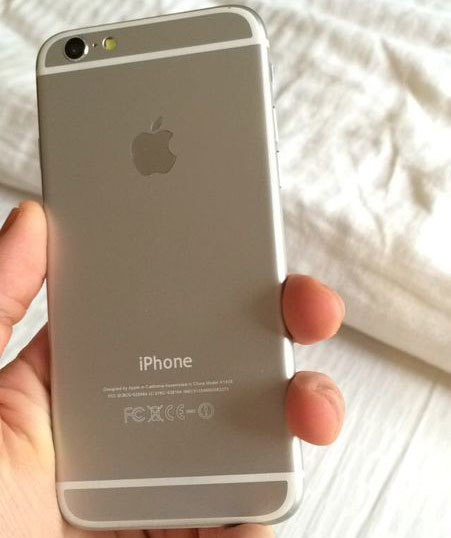
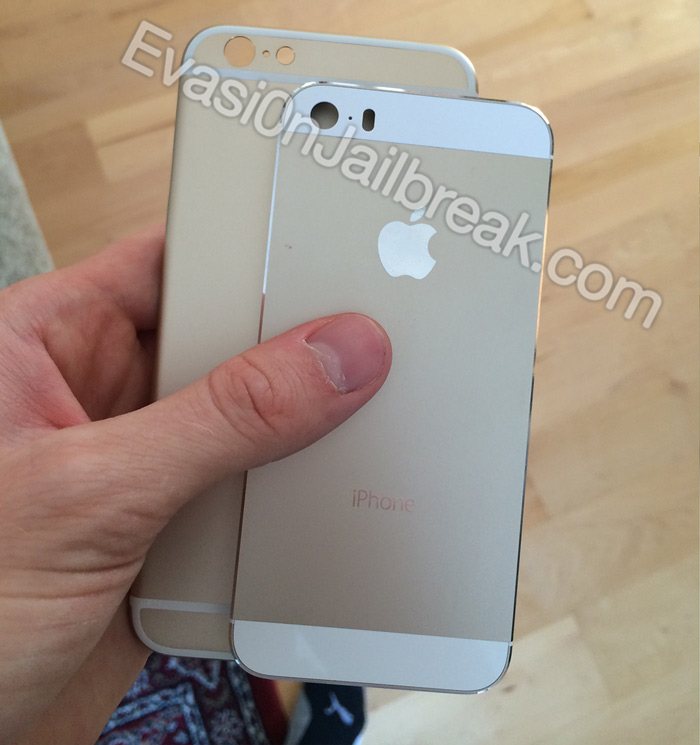
iPhone 6 Leaked Housing
For those who aren’t up to speed on the latest rumors, the iPhone 6 will be Apple’s eighth generation iPhone (ninth when counting the iPhone 5c, but that is really more of a iPhone 5 variant than its own generation), and is widely expected to sport a drastic redesign, include significant improvements and will likely launch this fall.


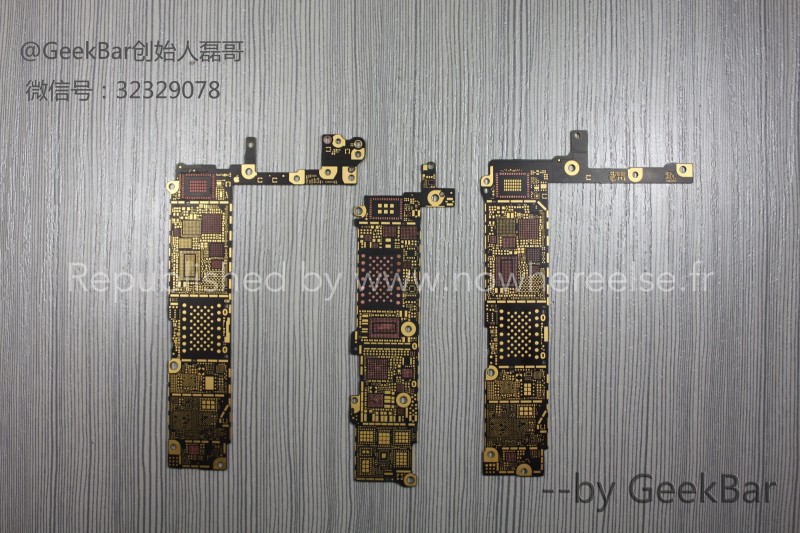
iPhone 6 Leaked Bare Logic Boards
The photos include side-by-side comparisons of the part from both iPhone 6 models and the iPhone 5s, and while it does not appear to be confirmed which iPhone 6 logic board is for which device size, there are now clearly two distinct parts larger than the current iPhone 5s logic board


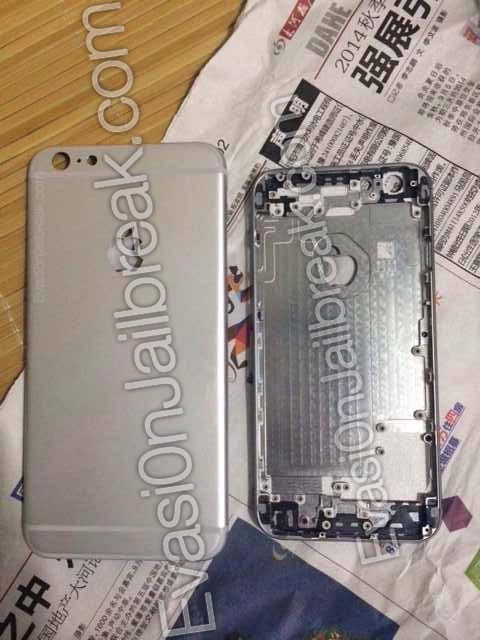
iPhone 6 Leaked Rear Shell Surfaces
That said, the 5.5-inch iPhone 6 rear shell images, which are compared in the photos to the rear shell of a 4.7-inch iPhone, do resemble early images of the 4.7-inch iPhone 6 rear shell, depicting thick antenna breaks, a rounded True Tone flash, a cutout for an embedded Apple logo, the camera, and the microphone.


Apple is expected to introduce the iPhone 6 at an event on September 9, but it is unclear whether the company will show off both the 4.7-inch and 5.5-inch models at the same time. If the 5.5-inch iPhone 6 does make an appearance at the event, it may not ship to customers until several months after the 4.7-inch iPhone 6 ships due to production delays.